
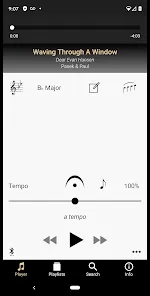

Appcompanist is an innovative application designed to assist musicians, particularly vocalists and instrumentalists, in practicing and performing their pieces more effectively. By providing a user-friendly platform with numerous features, it simplifies the process of learning and mastering musical works.
Features of Appcompanist
- Custom Accompaniments: Users can generate unique accompaniments tailored to their specific needs, including varying tempos and styles.
- Sheet Music Integration: The app allows seamless integration of sheet music, enabling users to view their scores while practicing.
- Looping Functionality: Musicians can loop specific sections of music to focus on challenging passages.
- Transposition Options: Appcompanist supports transposing music to different keys, making it versatile for various instruments and vocal ranges.
- Audio Playback: The app offers high-quality audio playback, ensuring users can practice with a realistic sound.
- Personalized Practice Plans: Users can create tailored practice schedules to enhance their learning experience.
Pros & Cons of Appcompanist
Pros
- User-Friendly Interface: The intuitive design makes navigation simple, even for those who are not tech-savvy.
- High Customizability: The ability to personalize settings and accompaniments caters to individual preferences.
- Comprehensive Library: A vast selection of music pieces is available, providing ample choices for practice.
- Regular Updates: The app receives frequent updates, introducing new features and improvements based on user feedback.
Cons
- Subscription Costs: While offering a wealth of features, some users may find the subscription fee to be on the higher side.
- Learning Curve: Although the app is user-friendly, new users may initially face a slight learning curve in exploring all functionalities.
- Limited Offline Access: Certain features require an internet connection, which may be inconvenient for users in areas with poor connectivity.
Functions of Appcompanist
- Accompaniment Generation: Users can create piano or instrumental accompaniments based on the selected piece.
- Score Viewing: The app allows users to view their sheet music while practicing, making it easier to stay in sync with the accompaniment.
- Record and Playback: Musicians can record their practice sessions and listen back for self-assessment and improvement.
- Practice Mode: The practice mode helps users break down complex pieces into manageable sections for focused practice.
- Collaboration Features: Users can share their practice sessions with others, enabling collaborative learning and feedback.
How to Use Appcompanist
- Download and Install: Begin by downloading Appcompanist from the App Store or Google Play and install it on your device.
- Create an Account: Open the app and create a user account. This will allow you to save your settings and preferences.
- Select a Piece: Browse through the extensive library to select the musical piece you want to practice.
- Customize Accompaniment: Adjust the tempo, style, and key to fit your practice needs.
- Use Practice Tools: Utilize features like looping and recording to enhance your practice sessions.
- Track Progress: Regularly check your practice plans and progress within the app to stay motivated and focused on improvement.



 0
0